A shared operating clock for distributed teams.

Team Time Zones is a lightweight web app that lets distributed teams define their own members, locations, and working hours, then visualize everyone on a single shared timeline.
Built from a real scheduling pain point, the tool translates each teammate’s local workday into the primary user’s time zone, showing overlap, live status, and “online/offline” windows at a glance. No logins, no accounts. Just a simple, config-driven microsite that keeps global teams in sync.
Services
Date
Apr 2025
Client
The Agency RE
Project
Team Time Zones
Industry
Productivity Tools
Timeline
1 Months
Desktop Interface
The Problem
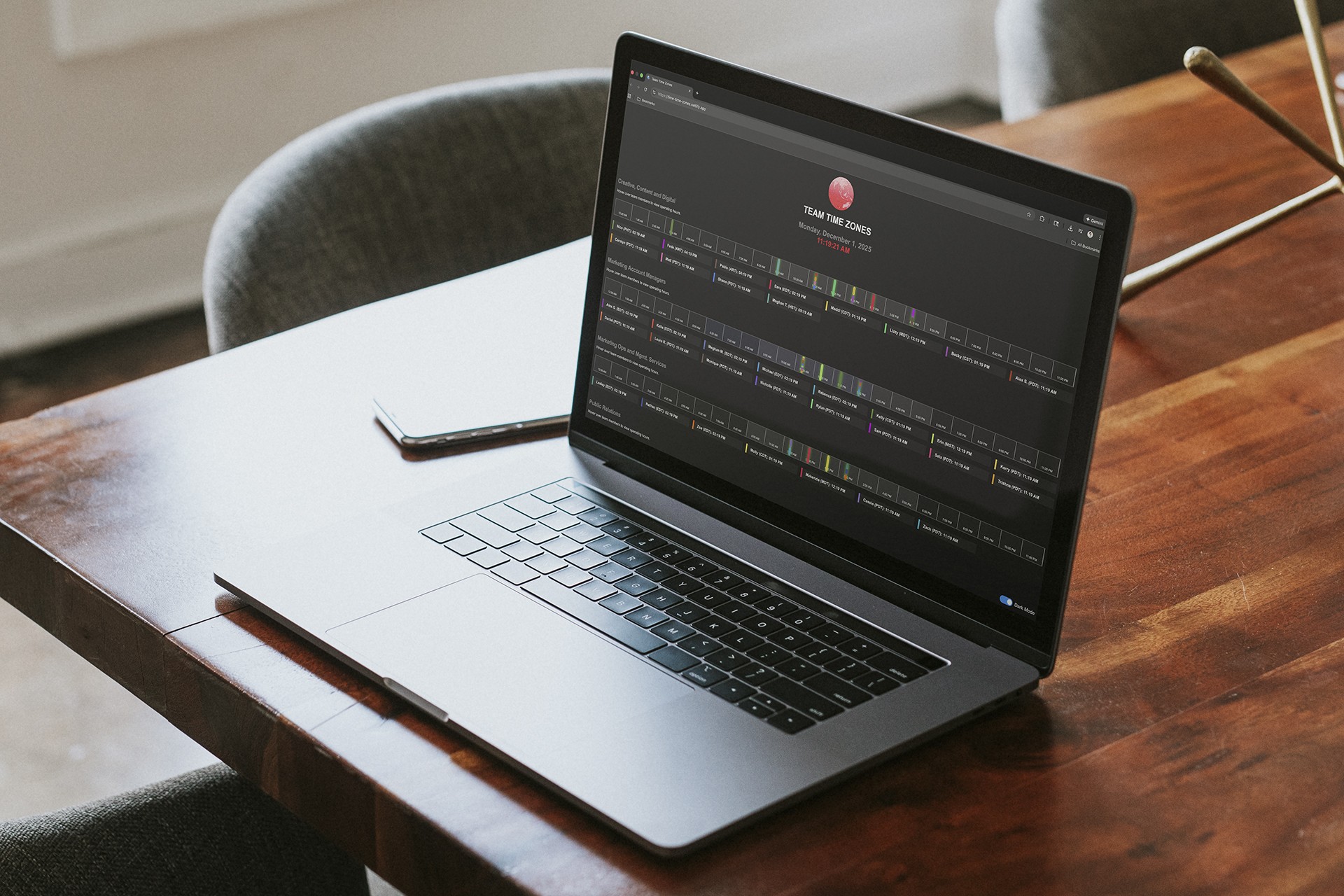
Time converters show hours, not humans. Distributed teams needed a visual way to see when others were actually online.
Team Time Zones transforms scattered schedules into a single shared timeline. It maps each person’s day onto the primary user’s, revealing overlap and rhythm across global teams.
Mobile Interface
Constraints
Lightweight, local, and universal. Built to work anywhere, for anyone.
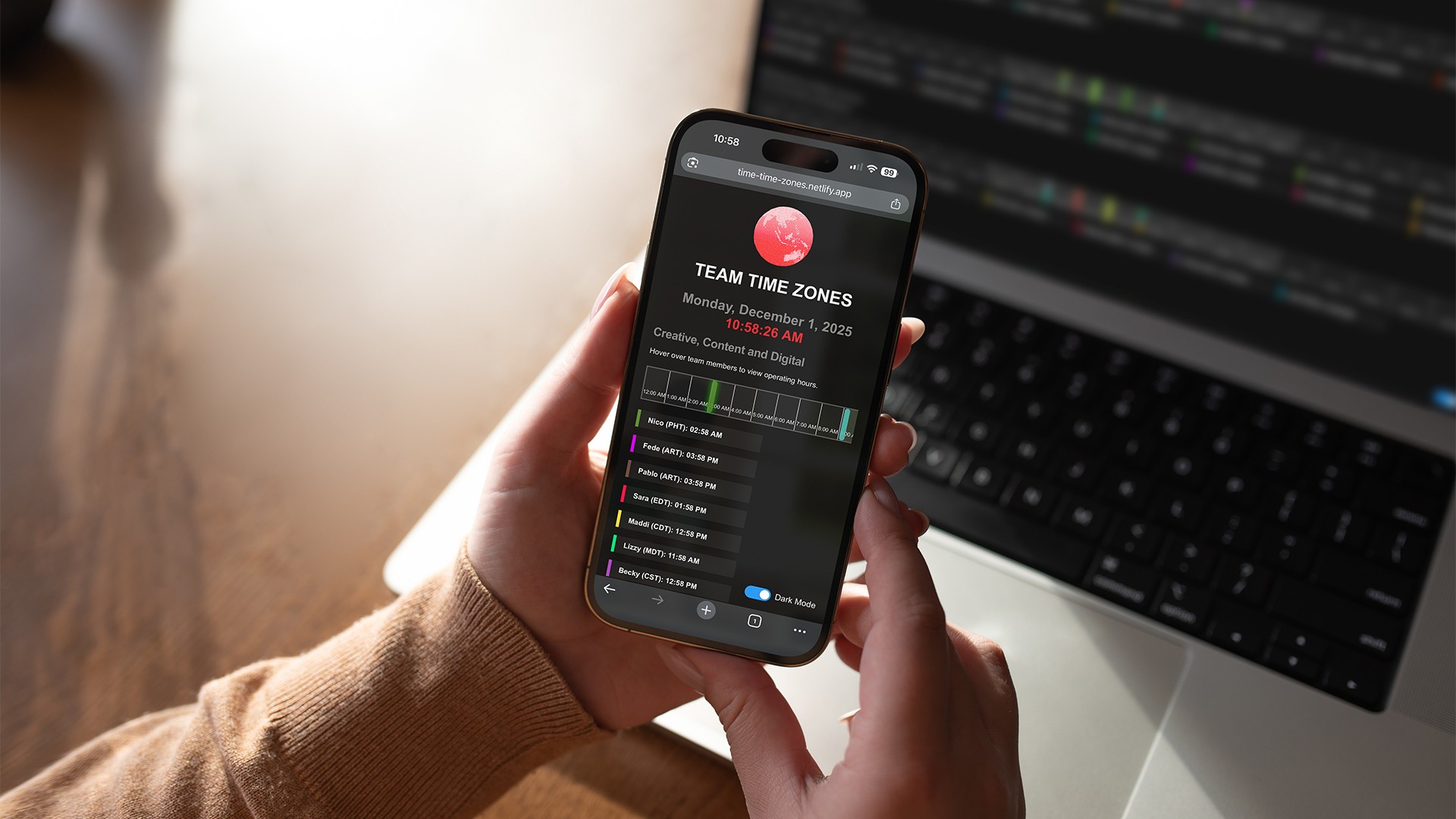
The site runs entirely in localStorage, with no logins or backend. Every element - from color-coded hours to live status - had to fit within a single responsive screen while remaining clear, accessible, and easy to configure.
Living Timelines

UX & Interaction
Built as a single-screen experience, every interaction serves clarity over complexity.
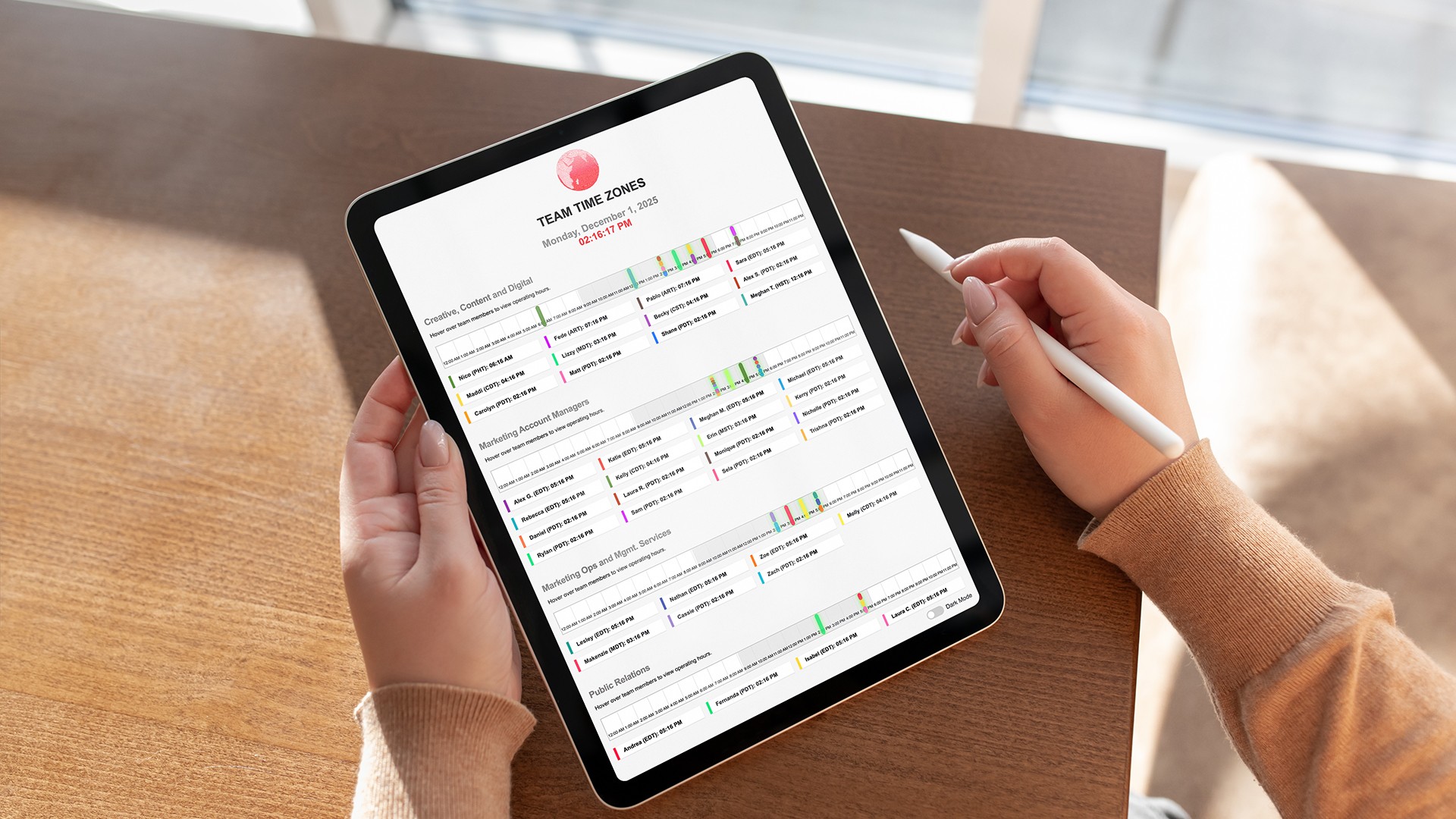
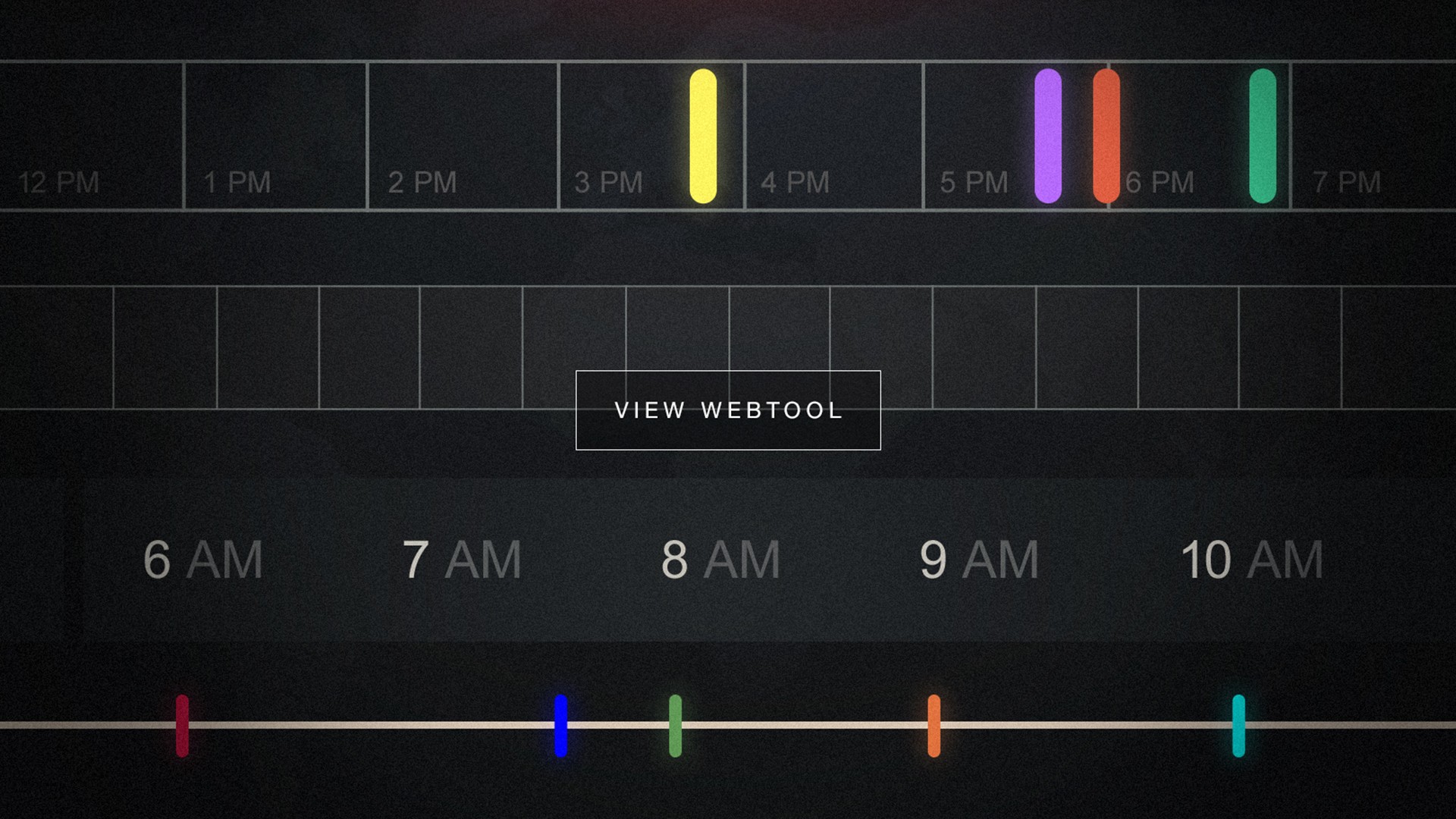
The microsite visualizes working hours as horizontal bands across a shared 24-hour timeline. A moving pin indicates the current time, while hovering over a teammate reveals their active window relative to the primary user. Each element - from color coding to subtle motion - was designed to feel intuitive, ambient, and immediate.
Trimmed Sample
Architecture & Data Model
A front-end–only system driven by simple team configs and time-mapping logic.
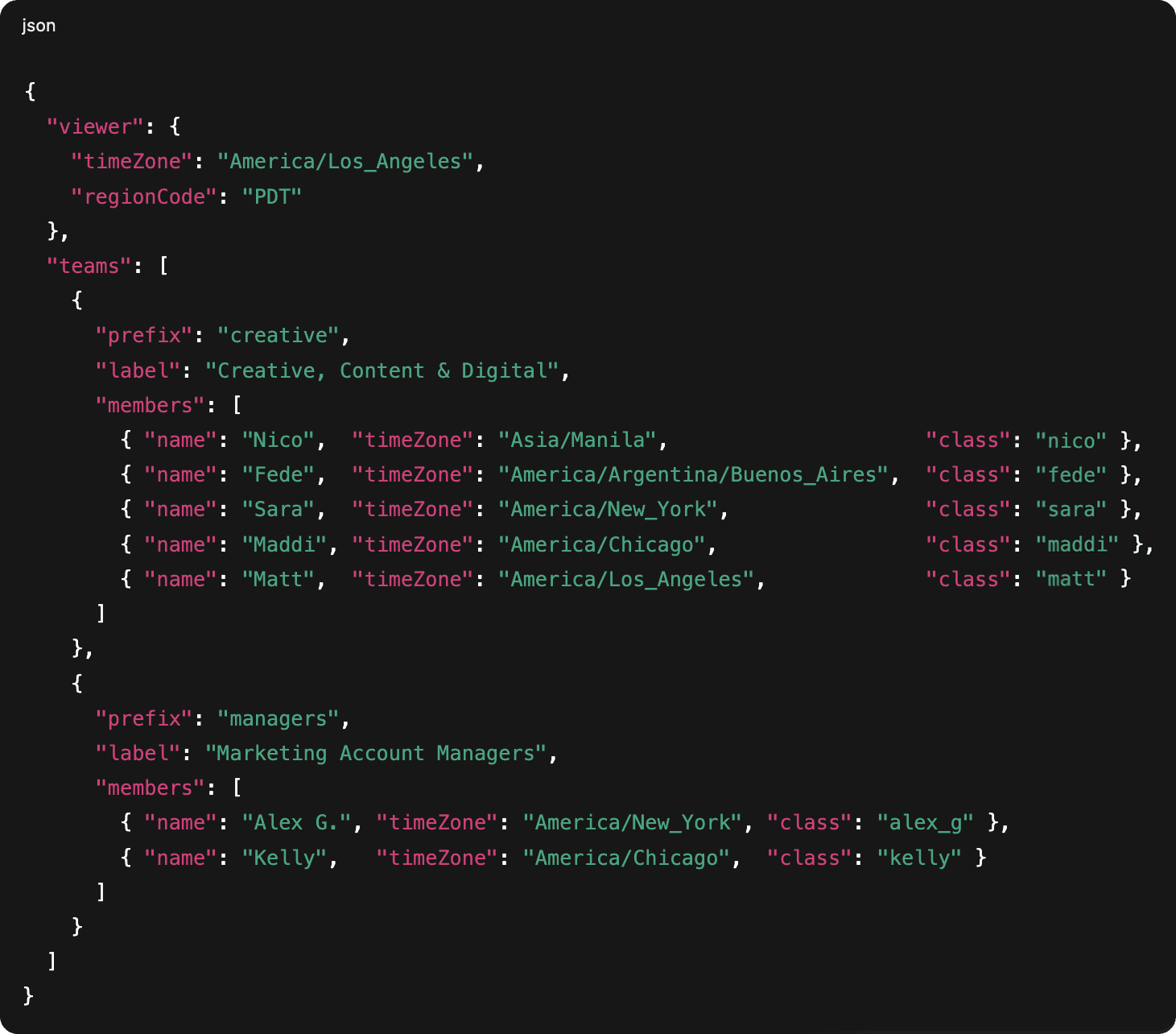
The microsite runs entirely in the browser using HTML, CSS, and vanilla JavaScript. Each timeline is created by calling setupTeamTimeline with a prefix and a team array, where every member has a name, IANA time zone, and CSS class that controls their color and styling. Working windows are calculated on the fly by getTranslatedWorkingMinutes, which maps each person’s schedule into the viewer’s region (PDT, EDT, CDT, etc.) and then onto a 24-hour timeline. Local theme preference (light/dark) is the only state stored in localStorage, keeping the system lightweight and self-contained.
Time Translation
Online/Offline Status
Key Logic
Behind the visuals, it’s just time translation and simple rules for “who’s online when.”
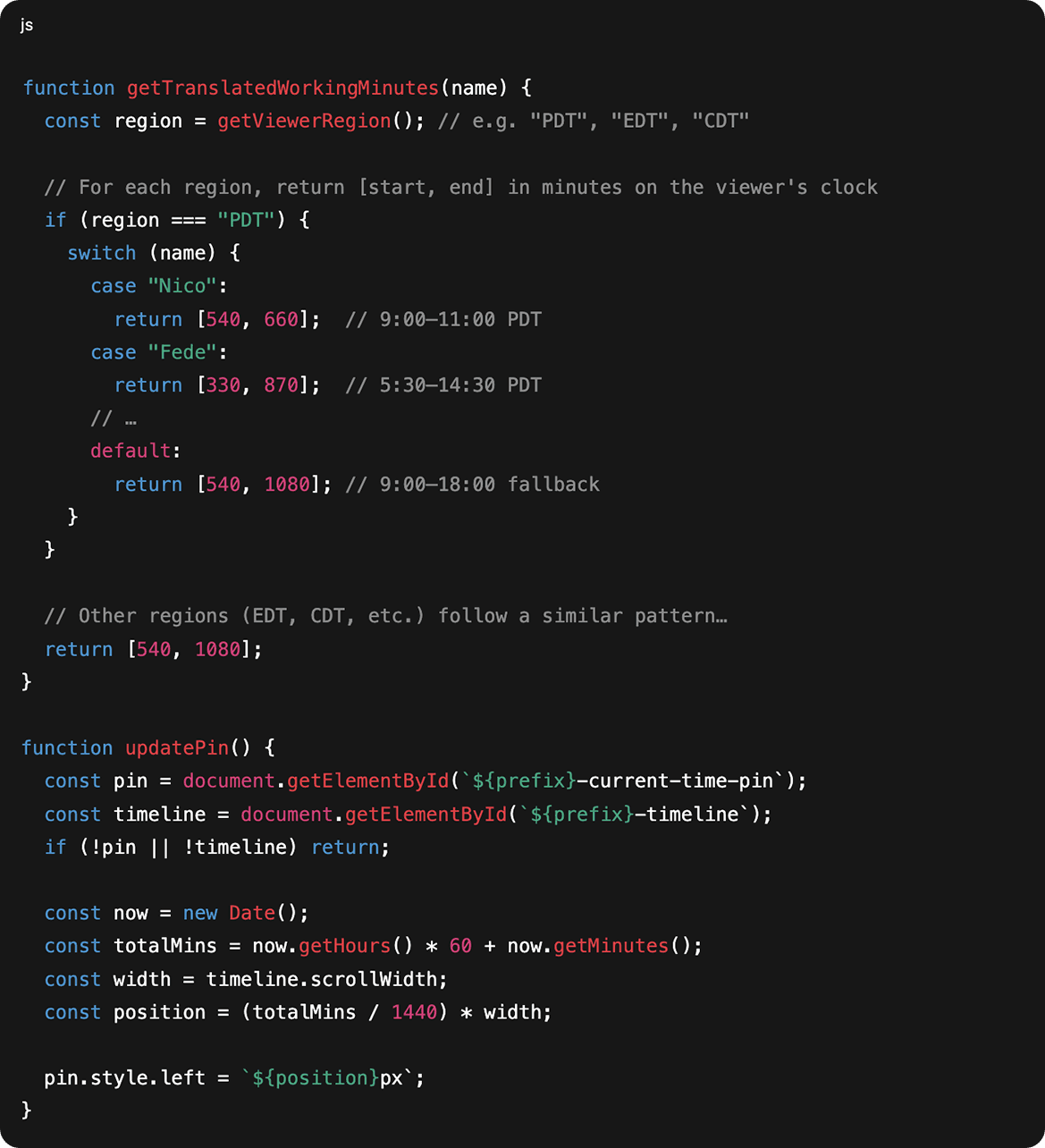
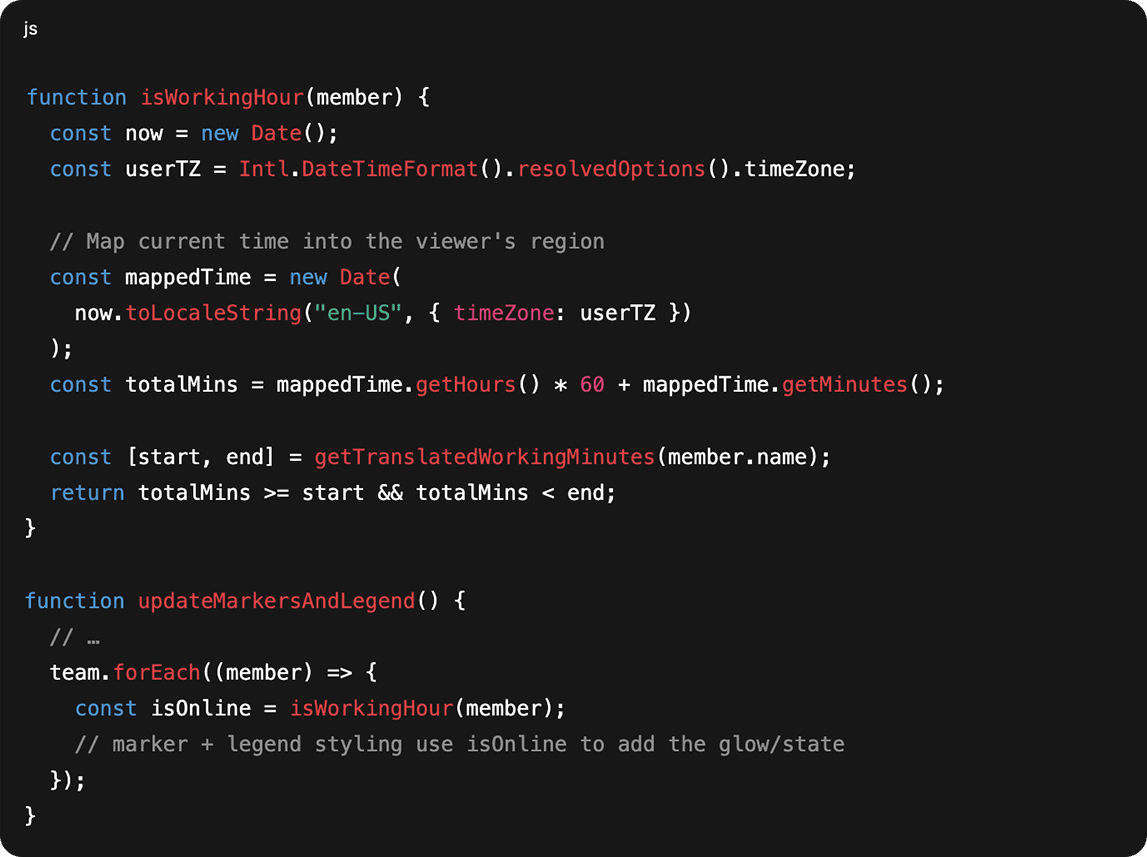
The microsite first detects the viewer’s region (PDT, EDT, CDT, etc.) with getViewerRegion, then uses getTranslatedWorkingMinutes to map each teammate’s schedule into that local frame as minutes on a 24-hour clock. Those minutes become positions on the timeline, powering the moving pin, the colored markers, and the hover overlay that reveals each person’s working window. A small helper, isWorkingHour, checks whether the current mapped time falls inside a member’s translated range, toggling their “online” glow in both the timeline and legend. The result is a live, ambient representation of a team’s rhythm with no backend and no heavy data layer.
Closeup

Design Decisions
Every interaction choice ties back to how time is visualized.
The design treats time not as a list of clocks, but as a shared visual space. A single 24-hour band, anchored to the viewer’s own day, lets every teammate’s schedule appear in context. Color is used sparingly but meaningfully: each member’s hue repeats across the marker, hover overlay, and legend accent, building quick visual association. The glow effect that signals “online” mirrors the soft pulse of activity, while dark mode preserves legibility without altering hierarchy.
Tablet Interface
From Prototype to Microsite
Evolved from a static timeline into a living, configurable tool.
The first version of this project was a static internal prototype: hard-coded names, fixed time zones, and no interactivity beyond a ticking clock. As the system grew, the logic was refactored into setupTeamTimeline() functions that generate entire groups from simple config arrays. Each team now renders dynamically - markers, legends, overlays - all driven by a few lines of input data. The addition of region detection, light/dark persistence, and a unified rendering engine turned what began as an experiment into a flexible microsite that could serve any distributed team without needing a backend.
A shared operating clock for distributed teams.
A shared operating clock for distributed teams.
Team Time Zones is a lightweight web app that lets distributed teams define their own members, locations, and working hours, then visualize everyone on a single shared timeline.
Built from a real scheduling pain point, the tool translates each teammate’s local workday into the primary user’s time zone, showing overlap, live status, and “online/offline” windows at a glance. No logins, no accounts. Just a simple, config-driven microsite that keeps global teams in sync.
Services
Date
Apr 2025
Client
The Agency RE
Project
Team Time Zones
Industry
Productivity Tools
Timeline
1 Months
Desktop Interface
The Problem
The Problem
Time converters show hours, not humans. Distributed teams needed a visual way to see when others were actually online.
Team Time Zones transforms scattered schedules into a single shared timeline. It maps each person’s day onto the primary user’s, revealing overlap and rhythm across global teams.
Team Time Zones transforms scattered schedules into a single shared timeline. It maps each person’s day onto the primary user’s, revealing overlap and rhythm across global teams.
Mobile Interface
Constraints
Constraints
Lightweight, local, and universal. Built to work anywhere, for anyone.
The site runs entirely in localStorage, with no logins or backend. Every element - from color-coded hours to live status - had to fit within a single responsive screen while remaining clear, accessible, and easy to configure.
The site runs entirely in localStorage, with no logins or backend. Every element - from color-coded hours to live status - had to fit within a single responsive screen while remaining clear, accessible, and easy to configure.
Living Timelines
UX & Interaction
UX & Interaction
Built as a single-screen experience, every interaction serves clarity over complexity.
The microsite visualizes working hours as horizontal bands across a shared 24-hour timeline. A moving pin indicates the current time, while hovering over a teammate reveals their active window relative to the primary user. Each element - from color coding to subtle motion - was designed to feel intuitive, ambient, and immediate.
The microsite visualizes working hours as horizontal bands across a shared 24-hour timeline. A moving pin indicates the current time, while hovering over a teammate reveals their active window relative to the primary user. Each element - from color coding to subtle motion - was designed to feel intuitive, ambient, and immediate.
Trimmed Sample
Architecture & Data Model
Architecture & Data Model
A front-end–only system driven by simple team configs and time-mapping logic.
The microsite runs entirely in the browser using HTML, CSS, and vanilla JavaScript. Each timeline is created by calling setupTeamTimeline with a prefix and a team array, where every member has a name, IANA time zone, and CSS class that controls their color and styling. Working windows are calculated on the fly by getTranslatedWorkingMinutes, which maps each person’s schedule into the viewer’s region (PDT, EDT, CDT, etc.) and then onto a 24-hour timeline. Local theme preference (light/dark) is the only state stored in localStorage, keeping the system lightweight and self-contained.
The microsite runs entirely in the browser using HTML, CSS, and vanilla JavaScript. Each timeline is created by calling setupTeamTimeline with a prefix and a team array, where every member has a name, IANA time zone, and CSS class that controls their color and styling. Working windows are calculated on the fly by getTranslatedWorkingMinutes, which maps each person’s schedule into the viewer’s region (PDT, EDT, CDT, etc.) and then onto a 24-hour timeline. Local theme preference (light/dark) is the only state stored in localStorage, keeping the system lightweight and self-contained.
Time Translation
Online/Offline Status
Key Logic
Key Logic
Behind the visuals, it’s just time translation and simple rules for “who’s online when.”
The microsite first detects the viewer’s region (PDT, EDT, CDT, etc.) with getViewerRegion, then uses getTranslatedWorkingMinutes to map each teammate’s schedule into that local frame as minutes on a 24-hour clock. Those minutes become positions on the timeline, powering the moving pin, the colored markers, and the hover overlay that reveals each person’s working window. A small helper, isWorkingHour, checks whether the current mapped time falls inside a member’s translated range, toggling their “online” glow in both the timeline and legend. The result is a live, ambient representation of a team’s rhythm with no backend and no heavy data layer.
The microsite first detects the viewer’s region (PDT, EDT, CDT, etc.) with getViewerRegion, then uses getTranslatedWorkingMinutes to map each teammate’s schedule into that local frame as minutes on a 24-hour clock. Those minutes become positions on the timeline, powering the moving pin, the colored markers, and the hover overlay that reveals each person’s working window. A small helper, isWorkingHour, checks whether the current mapped time falls inside a member’s translated range, toggling their “online” glow in both the timeline and legend. The result is a live, ambient representation of a team’s rhythm with no backend and no heavy data layer.
Closeup
Design Decisions
Design Decisions
Every interaction choice ties back to how time is visualized.
The design treats time not as a list of clocks, but as a shared visual space. A single 24-hour band, anchored to the viewer’s own day, lets every teammate’s schedule appear in context. Color is used sparingly but meaningfully: each member’s hue repeats across the marker, hover overlay, and legend accent, building quick visual association. The glow effect that signals “online” mirrors the soft pulse of activity, while dark mode preserves legibility without altering hierarchy.
The design treats time not as a list of clocks, but as a shared visual space. A single 24-hour band, anchored to the viewer’s own day, lets every teammate’s schedule appear in context. Color is used sparingly but meaningfully: each member’s hue repeats across the marker, hover overlay, and legend accent, building quick visual association. The glow effect that signals “online” mirrors the soft pulse of activity, while dark mode preserves legibility without altering hierarchy.
Tablet Interface
From Prototype to Microsite
From Prototype to Microsite
Evolved from a static timeline into a living, configurable tool.
The first version of this project was a static internal prototype: hard-coded names, fixed time zones, and no interactivity beyond a ticking clock. As the system grew, the logic was refactored into setupTeamTimeline() functions that generate entire groups from simple config arrays. Each team now renders dynamically - markers, legends, overlays - all driven by a few lines of input data. The addition of region detection, light/dark persistence, and a unified rendering engine turned what began as an experiment into a flexible microsite that could serve any distributed team without needing a backend.
The first version of this project was a static internal prototype: hard-coded names, fixed time zones, and no interactivity beyond a ticking clock. As the system grew, the logic was refactored into setupTeamTimeline() functions that generate entire groups from simple config arrays. Each team now renders dynamically - markers, legends, overlays - all driven by a few lines of input data. The addition of region detection, light/dark persistence, and a unified rendering engine turned what began as an experiment into a flexible microsite that could serve any distributed team without needing a backend.
A shared operating clock for distributed teams.
A shared operating clock for distributed teams.
Team Time Zones is a lightweight web app that lets distributed teams define their own members, locations, and working hours, then visualize everyone on a single shared timeline.
Built from a real scheduling pain point, the tool translates each teammate’s local workday into the primary user’s time zone, showing overlap, live status, and “online/offline” windows at a glance. No logins, no accounts. Just a simple, config-driven microsite that keeps global teams in sync.
Services
Date
Apr 2025
Client
The Agency RE
Project
Team Time Zones
Industry
Productivity Tools
Timeline
1 Months
Desktop Interface
The Problem
The Problem
Time converters show hours, not humans. Distributed teams needed a visual way to see when others were actually online.
Team Time Zones transforms scattered schedules into a single shared timeline. It maps each person’s day onto the primary user’s, revealing overlap and rhythm across global teams.
Team Time Zones transforms scattered schedules into a single shared timeline. It maps each person’s day onto the primary user’s, revealing overlap and rhythm across global teams.
Mobile Interface
Constraints
Constraints
Lightweight, local, and universal. Built to work anywhere, for anyone.
The site runs entirely in localStorage, with no logins or backend. Every element - from color-coded hours to live status - had to fit within a single responsive screen while remaining clear, accessible, and easy to configure.
The site runs entirely in localStorage, with no logins or backend. Every element - from color-coded hours to live status - had to fit within a single responsive screen while remaining clear, accessible, and easy to configure.
Living Timelines
UX & Interaction
UX & Interaction
Built as a single-screen experience, every interaction serves clarity over complexity.
The microsite visualizes working hours as horizontal bands across a shared 24-hour timeline. A moving pin indicates the current time, while hovering over a teammate reveals their active window relative to the primary user. Each element - from color coding to subtle motion - was designed to feel intuitive, ambient, and immediate.
The microsite visualizes working hours as horizontal bands across a shared 24-hour timeline. A moving pin indicates the current time, while hovering over a teammate reveals their active window relative to the primary user. Each element - from color coding to subtle motion - was designed to feel intuitive, ambient, and immediate.
Trimmed Sample
Architecture & Data Model
Architecture & Data Model
A front-end–only system driven by simple team configs and time-mapping logic.
The microsite runs entirely in the browser using HTML, CSS, and vanilla JavaScript. Each timeline is created by calling setupTeamTimeline with a prefix and a team array, where every member has a name, IANA time zone, and CSS class that controls their color and styling. Working windows are calculated on the fly by getTranslatedWorkingMinutes, which maps each person’s schedule into the viewer’s region (PDT, EDT, CDT, etc.) and then onto a 24-hour timeline. Local theme preference (light/dark) is the only state stored in localStorage, keeping the system lightweight and self-contained.
The microsite runs entirely in the browser using HTML, CSS, and vanilla JavaScript. Each timeline is created by calling setupTeamTimeline with a prefix and a team array, where every member has a name, IANA time zone, and CSS class that controls their color and styling. Working windows are calculated on the fly by getTranslatedWorkingMinutes, which maps each person’s schedule into the viewer’s region (PDT, EDT, CDT, etc.) and then onto a 24-hour timeline. Local theme preference (light/dark) is the only state stored in localStorage, keeping the system lightweight and self-contained.
Time Translation
Online/Offline Status
Key Logic
Key Logic
Behind the visuals, it’s just time translation and simple rules for “who’s online when.”
The microsite first detects the viewer’s region (PDT, EDT, CDT, etc.) with getViewerRegion, then uses getTranslatedWorkingMinutes to map each teammate’s schedule into that local frame as minutes on a 24-hour clock. Those minutes become positions on the timeline, powering the moving pin, the colored markers, and the hover overlay that reveals each person’s working window. A small helper, isWorkingHour, checks whether the current mapped time falls inside a member’s translated range, toggling their “online” glow in both the timeline and legend. The result is a live, ambient representation of a team’s rhythm with no backend and no heavy data layer.
The microsite first detects the viewer’s region (PDT, EDT, CDT, etc.) with getViewerRegion, then uses getTranslatedWorkingMinutes to map each teammate’s schedule into that local frame as minutes on a 24-hour clock. Those minutes become positions on the timeline, powering the moving pin, the colored markers, and the hover overlay that reveals each person’s working window. A small helper, isWorkingHour, checks whether the current mapped time falls inside a member’s translated range, toggling their “online” glow in both the timeline and legend. The result is a live, ambient representation of a team’s rhythm with no backend and no heavy data layer.
Closeup
Design Decisions
Design Decisions
Every interaction choice ties back to how time is visualized.
The design treats time not as a list of clocks, but as a shared visual space. A single 24-hour band, anchored to the viewer’s own day, lets every teammate’s schedule appear in context. Color is used sparingly but meaningfully: each member’s hue repeats across the marker, hover overlay, and legend accent, building quick visual association. The glow effect that signals “online” mirrors the soft pulse of activity, while dark mode preserves legibility without altering hierarchy.
The design treats time not as a list of clocks, but as a shared visual space. A single 24-hour band, anchored to the viewer’s own day, lets every teammate’s schedule appear in context. Color is used sparingly but meaningfully: each member’s hue repeats across the marker, hover overlay, and legend accent, building quick visual association. The glow effect that signals “online” mirrors the soft pulse of activity, while dark mode preserves legibility without altering hierarchy.
Tablet Interface
From Prototype to Microsite
From Prototype to Microsite
Evolved from a static timeline into a living, configurable tool.
The first version of this project was a static internal prototype: hard-coded names, fixed time zones, and no interactivity beyond a ticking clock. As the system grew, the logic was refactored into setupTeamTimeline() functions that generate entire groups from simple config arrays. Each team now renders dynamically - markers, legends, overlays - all driven by a few lines of input data. The addition of region detection, light/dark persistence, and a unified rendering engine turned what began as an experiment into a flexible microsite that could serve any distributed team without needing a backend.
The first version of this project was a static internal prototype: hard-coded names, fixed time zones, and no interactivity beyond a ticking clock. As the system grew, the logic was refactored into setupTeamTimeline() functions that generate entire groups from simple config arrays. Each team now renders dynamically - markers, legends, overlays - all driven by a few lines of input data. The addition of region detection, light/dark persistence, and a unified rendering engine turned what began as an experiment into a flexible microsite that could serve any distributed team without needing a backend.